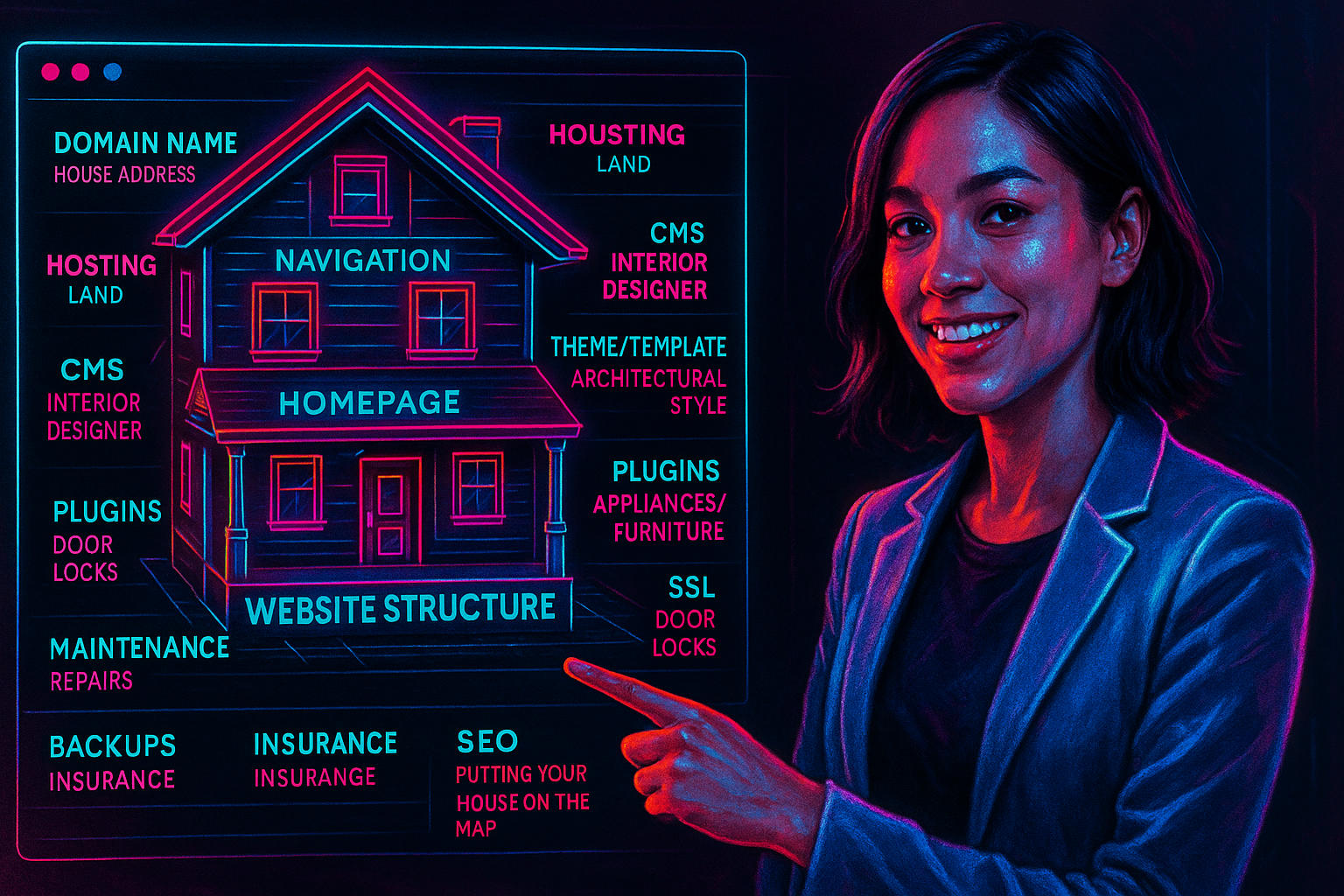
Building a website can feel like a daunting task, especially for those who may not be particularly tech-savvy. Terms such as domain, hosting, CMS, and SSL certificate often sound like a complex foreign language. But what if we told you there’s a simple and captivating way to demystify it all?
Think of your website as a beautiful, welcoming house.
This analogy serves as a powerful tool to clarify the essential components of a website engagingly that anyone, even those without technical expertise, can easily grasp. In this article, we will lead you through the journey of building your website step by step, using the comforting and familiar concept of constructing a house. Let’s embark on this exciting adventure together!
1. Domain Name = Your House Address
Let’s start with the most recognizable part: your domain name (e.g., smiling-mind.flywheelstaging.com). In the online world, a domain name is like your house address. It’s how people locate your website. When someone types in your domain, they are essentially asking, “Where does this website live?” The domain directs them to the correct location.
Just as no two houses can share the same physical address, no two websites can have the same domain name. It must be unique and registered, typically for a yearly fee, similar to maintaining an address in a property registry.
Tip:
Choosing a good domain is like choosing a memorable, easy-to-pronounce address — make it simple, relevant to your business, and easy to spell.
2. Web Hosting = The Land Where Your House Is Built
Now, what good is an address if there’s no land to build on?
Web hosting is like the land or lot where your house (website) is built. You need this digital “land” to place all your files — your walls, furniture, appliances, and design elements — which make up your actual house.
There are various types of hosting, each like a different type of real estate:
- Shared Hosting = Apartment complex (you share space and resources)
- VPS Hosting = Townhouse (dedicated part of the server with more freedom)
- Dedicated Hosting = Standalone house (full control and space)
- Cloud Hosting = Modular home across multiple lots (scalable and flexible)
Reliable hosting means faster loading, fewer crashes, and better security — much like choosing a solid and secure plot of land.
3. Website Files = The House Structure
Once you have land, it’s time to build your house.
All the code, images, text, stylesheets, and databases are like the walls, rooms, paint, wiring, and plumbing in your house. These are the physical components of your website — the structure that makes it work and look the way it should.
This includes:
- HTML – the framing and structure
- CSS – the paint, design, and decorations
- JavaScript – the automation, interactivity (lights turning on, doors opening)
- Images/Videos – your furniture and decor
All these files are stored on your hosting “land” and shown to users when they visit your domain.
4. Content Management System (CMS) = Your Interior Designer
A CMS like WordPress, Joomla, or Shopify is like hiring an interior designer or using an interior layout system.
Instead of hammering every nail yourself (writing code), a CMS gives you tools, templates, and drag-and-drop features to design the interior easily.
With a CMS, you don’t have to be an architect or builder — you can arrange rooms (pages), place furniture (images), and change paint colors (styles) without needing to call the construction team (developers) every time.
5. Theme or Template = House Style or Architecture
When you select a theme or template for your website, you’re essentially choosing its architectural style—be it sleek and modern, elegantly minimalist, timelessly traditional, or boldly industrial.
This theme not only shapes the aesthetic and layout of your site but also conveys a distinct personality, much like how the architectural style of a house defines its roofline, window designs, and the flow of its interior spaces.
Moreover, just as one might enhance a home by adding a luxurious pool, expanding a cozy room, or upgrading a kitchen with the latest appliances, you can further tailor your website with plugins or custom code, crafting a unique online experience that reflects your vision and meets your needs.
6. Plugins or Extensions = Home Appliances and Furniture
Are you in search of features like a contact form, an online store, or an image gallery? Think of these functionalities as akin to essential home appliances—ovens, refrigerators, and washing machines—or the beautiful pieces of furniture that adorn your living space, such as tables, beds, and chairs.
Plugins serve as the secret sauce that enhances your website’s functionality. While they are not strictly necessary for its foundational structure, they significantly elevate the user experience and make navigation a breeze. Some plugins are wonderfully simple, reminiscent of a charming wall clock, while others can be as intricate and protective as a state-of-the-art home security system.
However, be mindful that the more plugins you incorporate, the greater the maintenance required to keep them working harmoniously together—similar to ensuring your furniture complements your rooms without creating clutter. Embrace the enhancements, but do so with care! Are you looking for features such as a contact form, an online store, or an image gallery? These functionalities are similar to home appliances (like ovens, refrigerators, and washing machines) or furniture (such as tables, beds, and chairs).
Plugins add extra functionality to your website. While they are not essential for its basic structure, they enhance usability and improve navigation. Some plugins are straightforward, like a simple wall clock, while others are more complex, similar to a comprehensive home security system.
However, keep in mind that the more plugins you add, the more maintenance is required to ensure they don’t conflict with one another—much like making sure your furniture fits well in your rooms without causing clutter.
7. SSL Certificate = Security System or Door Lock
An SSL certificate secures the communication between your house and visitors — like a door lock or a home security system.
It encrypts information (such as contact forms or credit card data), protecting you and your guests (website users) from intruders or eavesdropping.
When your site has an SSL certificate, visitors see a padlock icon in the browser. Without it, browsers might warn visitors that your “house” is unsafe — and many will leave without entering.
8. Maintenance & Updates = Housekeeping and Repairs
Every house needs maintenance — repainting walls, fixing leaks, or replacing broken tiles.
Websites are no different. Regular updates to your CMS, plugins, themes, and server are essential to keep things running smoothly. Otherwise, outdated tools may cause bugs, security issues, or site crashes — like a leaky roof during a storm.
Neglecting maintenance is one of the biggest reasons websites break down over time.
9. Website Backup = Home Insurance
Picture this: your home is engulfed in flames, or it falls victim to a burglary. Imagine losing everything you hold dear. This is precisely why website backups are indispensable—they serve as your safety net, much like insurance for your home. Backups ensure that when disaster strikes—be it a hack, an error during an update, or an accidental deletion—you can effortlessly restore your website to a previous version, safeguarding your hard work and precious content.
A trustworthy hosting company often provides daily or weekly backups, but for added peace of mind, consider utilizing third-party tools as well. Protect what matters most to you; your online presence deserves nothing less. Imagine your house caught fire or was broken into. What if you lost everything inside? This is where website backups become crucial—they act like insurance for your home. Backups ensure that if something goes wrong—whether it’s a hack, an error during an update, or accidental deletion—you can restore your website to a previous version without losing everything.
A reliable hosting company typically provides daily or weekly backups. Additionally, you can use third-party tools for extra protection.
10. SEO = Putting Your House on the Map
You’ve built your dream house, but what if no one can find it?
That’s where Search Engine Optimization (SEO) comes in. It’s like putting your house on Google Maps or adding signs around town pointing to your location.
SEO helps search engines discover your website and rank it so that more people can visit — the equivalent of increasing foot traffic or guests to your home.
Website Analytics = Security Cameras and Visitor Logs
Would you like to know who visits your website, how long they stay, or which pages they view? That’s the purpose of website analytics tools like Google Analytics. They monitor visitor behavior, allowing you to make informed decisions about improvements—whether it’s updating a webpage, reorganizing content, or changing your homepage headline.
Why You Need a Reliable Web Design Partner
Now that you know the many components that go into building a website, here’s the truth: it’s not a DIY job for everyone.
Just like building a real house, you wouldn’t do it alone unless you’re an expert architect, engineer, and contractor in one. The same applies to websites. That’s why working with a professional web design and development agency is essential.
Here’s why:
- Expertise: A skilled agency knows how to balance function, performance, and aesthetics — building a beautiful and efficient site from the ground up.
- Time Savings: Instead of spending months figuring things out, you let professionals handle the technical work so you can focus on running your business.
- Scalability: A good agency plans for the future. Your website should grow as your business grows, just like expanding your house when you have a growing family.
- Security and Stability: A reliable team knows how to secure your website, update plugins, patch vulnerabilities, and prevent breakdowns.
- Support and Maintenance: After the site goes live, who will maintain it? A good agency will offer ongoing support, like a property manager for your digital house.
Think of them as your general contractor — someone who understands every part of the build and ensures your online property is strong, safe, and successful.
Every Part Has a Price — Just Like a Real House
One last important point: every part of a website has a cost, just like building and maintaining a home.
Here’s a sample breakdown:
|
Website Element |
Home Equivalent |
Usual Cost |
|
Domain Name |
House Address |
Annual registration (₱500–₱2,000/year) |
|
Hosting |
Land |
Monthly/Yearly (₱1,000–₱10,000+) |
|
Website Design/Development |
Construction |
One-time or phased (₱40,000–₱150,000+) |
|
CMS (WordPress, Shopify) |
Interior System |
Free to subscription-based |
|
Plugins/Features |
Appliances/Furniture |
Some free, some paid |
|
SSL Certificate |
Locks/Security |
Often free or ₱1,000+/year |
|
Maintenance |
Repairs/Upkeep |
Monthly retainer or as-needed |
|
SEO |
Marketing and Signage |
Project or monthly-based |
|
Backup & Security Tools |
Insurance |
Usually bundled or paid tools |
A professional agency helps you realistically budget these costs. While there are free or inexpensive options, investing in quality ensures that your website performs well, attracts traffic, and grows alongside your business.
Conclusion: Think Like a Homeowner, Build Like a Developer
Thinking of a website as a house helps simplify complex tech terms and makes web design and development easier to understand.
Understanding these components will enable you to make informed decisions about your online presence and recognize your website as the valuable digital asset it truly is.
Treat your website like a home: invest wisely, maintain it regularly, and collaborate with professionals who know how to create something solid, secure, and aesthetically pleasing.